 WhatsApp


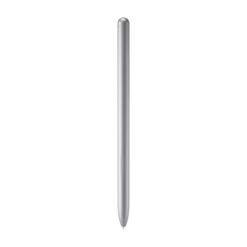


Samsung S Pen Stylus for Galaxy Tab S7 – Silver


£32.88
The Samsung S Pen for Galaxy Tab S7 in Mystic Silver — the official Bluetooth stylus for Tab S7 and S7+. 4,096 pressure levels, 0.7mm tip, Bluetooth Air Actions for remote gestures. Magnetic attachment to tablet back. Air Command shortcuts, precise writing and natural drawing. Also compatible with Tab S8, S8+ and S8 Ultra.
- ✓ Bluetooth Air Actions — remote gesture control without touching screen
- ✓ 4,096 pressure levels · 0.7mm tip — precise writing and drawing
- ✓ Magnetic attachment to tablet — always secure, always on hand
- ✓ Air Command · Mystic Silver · compatible with Tab S7 / S7+ / S8 series
In stock
| Delivery | 4-6 working days • Fully tracked |
| Returns | 30 Days Free |
| Warranty | 12 Months |
| Payment | Airwallex • PayPal • Klarna |
The Galaxy Tab S7 is Samsung’s flagship productivity tablet. The Samsung S Pen Stylus for Galaxy Tab S7 – Silver is what elevates it from a tablet to a full creative and professional tool. Unlike entry-level styluses, the S Pen uses Bluetooth to extend its function beyond the screen — Air Actions allow remote gesture control using just the pen’s side button, from flipping through presentation slides to taking camera shots without touching the display. On screen, 4,096 pressure levels and a 0.7mm tip deliver the kind of precision that makes handwriting feel natural and illustration work feel immediate. Air Command puts smart shortcuts — Smart Select, Screen Write, Translate and more — one hover away from any app. Magnetic attachment means the pen snaps to the back of the Tab S7 and travels with it, always charged by the tablet itself, always ready.
Bluetooth Air Actions
Remote Gestures Without Touching
Bluetooth Air Actions are what set the Tab S7 S Pen apart from simpler EMR styluses. When paired via Bluetooth, the S Pen’s side button becomes a remote control. Swipe left or right to flip slides in a presentation. Click to take a photo. Double-click to switch camera angle. Single-click to play or pause media. The gestures are customisable per-app and work up to a short distance from the tablet — useful for presenting, recording video or any situation where reaching the screen is inconvenient. The pen charges automatically via the magnetic connection to the tablet, with a full charge taking around 10 minutes and providing approximately 30 minutes of Bluetooth use.
Precision
4,096 Levels · 0.7mm Tip
4,096 pressure levels match the sensitivity of professional graphics tablets — the pen responds to how hard you press, varying line thickness and opacity in drawing apps as naturally as a real pencil or brush. The 0.7mm tip is finer than many styluses, giving precise control for detailed work, small handwriting and accurate selection of on-screen elements. Samsung Notes converts handwritten text to editable type automatically. Near-zero latency on the Tab S7 means there is no visible lag between pen movement and mark on screen — a fundamental requirement for note-taking to feel natural.
Air Command + Attach
Smart Shortcuts · Magnetic Charge
Hover the S Pen and press the button to open Air Command — a floating menu giving instant access to Smart Select, Screen Write, Live Messages, Translate and more, regardless of which app is open. The Tab S7’s magnetic S Pen slot on the side of the tablet holds the pen securely and charges it simultaneously. 8g weight makes the S Pen comfortable for extended writing without hand fatigue — significantly lighter than a standard pen. Attach, write, detach: the workflow is designed to be frictionless.
Great choice if you…
✔ Own a Galaxy Tab S7 or S7+ and need a replacement or spare S Pen
✔ Want Bluetooth Air Actions for remote gesture control
✔ Take handwritten notes, annotate documents or sketch on your tablet
✔ Present slides or control media without touching the screen
✔ Prefer Silver over Black or Bronze colour options
Consider something else if…
✖ You own a Tab S9 FE — that uses the EJ-PX510 S Pen (different model)
✖ You own a Galaxy Z Fold 5 — that needs the S Pen Fold Edition
✖ You need a Tab S9 / S9+ / S9 Ultra S Pen — different model (EJ-PX710)
Technical Specifications
| Brand / Model | Samsung S Pen (Tab S7 / S7+) |
| Pen Tip | 0.7mm |
| Pressure Levels | 4,096 |
| Bluetooth | Yes — Air Actions gesture control |
| Charging | Magnetic (via tablet slot) — ~10 min full charge |
| Battery Life | ~30 min Bluetooth use per charge |
| Air Command | Yes — Smart Select, Screen Write, Translate, more |
| Weight | 8g |
| Length | 127mm |
| Colour | Mystic Silver |
Box Contents
Compatible With
Condition
Brand New — Retail Packaging
Warranty
1 Year Samsung + 12 Months Seller
Delivery
4–5 Working Days · Fully Tracked
Browse the full Samsung S Pen range at maibo.
| Brand | Samsung |
|---|---|
| Colors |
Be the first to review “Samsung S Pen Stylus for Galaxy Tab S7 – Silver”
You must be logged in to post a review.
Related products
Mobile Phone Accessories
Samsung Tab S6 Digital Pen – Pink (Compatible with SM-T860 / SM-T865)
Mobile Phone Accessories
Beats RemoteTalk 3.5mm Audio Cable with Inline Mic & Remote for iOS
Mobile Phone Accessories
Mobile Phone Accessories
Mobile Phone Accessories
Reviews
There are no reviews yet.